Spades Stars - Card Game
- 4.8
- Rating
- 1.00M
- Installs
- Free
- Price

 Analysis by App-foxy
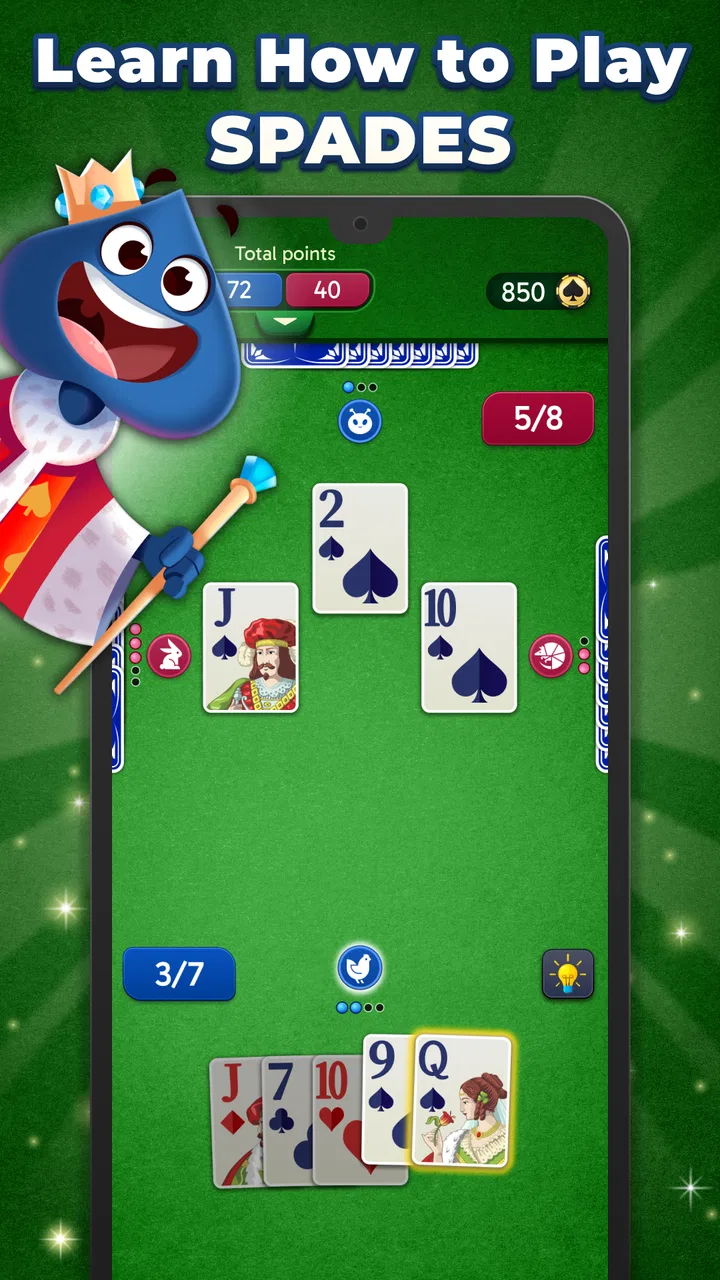
There is something appealing about a card game that does not demand a long explanation before the first hand. Spades Stars takes that approach with a familiar trick-taking format, a free download, and an emphasis on playing without a constant internet connection. I found its strongest quality in that simple promise: it is easy to pick up when I have a few spare minutes, yet it still gives me enough room to think about bids, suits, and the cards other players may be holding.
Developed by Bluetile, this is a card game for Everyone rather than a complicated strategy title aimed at experienced players only. It has reached over a million installs and holds a 4.8 average from around 142 thousand ratings, which suggests that its straightforward style has connected with a broad audience. The game was released on January 23, 2024, and version 2.4.1 is the version I would look for when checking compatibility on a device running Android 7.0 or later.
Why offline Spades changes the way I play
The capability that matters most here is offline play. That sounds modest, but it changes the role of the game. Instead of treating it as something I open only when I have a reliable connection, I can think of it as a pocket card table for waiting rooms, travel, breaks, or places where mobile data is inconvenient. The game’s store summary also presents it as something to enjoy with friends, so the offline focus is especially useful when the people around me want a quick card game without setting up a larger experience.
You May Also Like

 Blood Strike: 2.5 Anniversary
Blood Strike’s Loadouts Turn Every Drop Into a Tactical Gamble
A close look at Blood Strike’s custom loadouts: how fast access to signature weapons reshapes its battle royale rhythm, rewards preparation, and narrows the gap between fights.

 Pandora - Music & Podcasts
Pandora’s Music Is Easy to Start, but Harder to Recover
Pandora’s strength is its low-effort path from a seed to a station. Its weak spot is how much confidence it asks you to place in connection, setup, and quiet recovery.

 8 Ball Pool
 Is Built on Rivalries, Rematches, and Routine
A close look at the rivalries, rematches, shared routines, and unanswered safety questions that turn a quick pool match into a persistent mobile community.

 Samsung Music
’s Quiet Strength Is Playing What You Already Own
Its reach comes less from spectacle than from dependable access to a personal library. That simplicity is both the app’s strongest retention engine and its ceiling.

 AccuWeather: Weather Radar
AccuWeather Review: A Quick, Clear Forecast for Everyday Decisions
For everyday plans, the best forecast is the one you can understand quickly. AccuWeather makes rain timing, radar, and local conditions easy to act on, with a few trade-offs.

 Hill Climb Racing
Why Hill Climb Racing Still Turns Crashes Into One More Run
A tiny car, a bumpy hill and one more upgrade: Hill Climb Racing keeps resurfacing because its simple chaos makes every near-miss feel personal.
More From Our News Desk



Offline play is not automatically the same as a full tabletop replacement. The value depends on what I want from Spades at that moment. If I want a fast solo hand against computer opponents, removing the connection requirement is a genuine advantage. If I want a competitive online ladder, live matchmaking, or a social room with strangers, this is not the kind of experience I would choose first. Its appeal is more immediate and practical: open the game, start dealing, and concentrate on the hand.
That distinction is important because many card games use their online features as the central reason to return. Here, the attraction is closer to having a dependable digital deck available whenever I need it. I do not have to plan a session around another player being available, and I do not have to turn a short break into a commitment to a multiplayer match. For casual players, that can make the difference between actually playing and simply intending to play later.
The basic rules also help the offline capability work well. Spades is recognizable to anyone who has played trick-taking games, but it still rewards careful decisions. Bidding before the hand, judging the strength of a hand, and deciding when to spend a high spade create meaningful choices without requiring a large rulebook. I like that balance: the game can be introduced quickly, while repeated hands still give me something to improve.
What a typical hand feels like
In practice, I approach a hand by separating the obvious cards from the uncertain ones. A hand with several strong spades may support a confident bid, but the real question is whether the remaining cards can contribute enough tricks. That is where a simple card game becomes more interesting than a random tap-through experience. I have to estimate what I can take, what I may be forced to lose, and how the other players’ actions change that estimate.
The offline format makes this rhythm particularly comfortable. I can play one hand while waiting for a coffee, stop when I need to leave, and return later without having scheduled a complete multiplayer session. It is also a useful way to refresh the rules before playing physical Spades with friends. I would not use it as a substitute for learning every regional variation, because house rules can differ, but it is a convenient practice table for the core decision-making.
One practical tip is to avoid treating every high card as an invitation to bid aggressively. In Spades, control is valuable, but a hand can still become awkward when the lower suits are weak or when a strong card forces an unwanted lead later. I get more from the game when I use each hand to test my judgment rather than simply chasing the largest possible bid. That makes the offline mode feel less disposable and more like a small training exercise.
Another useful habit is to watch the suits that disappear from play. When I become void in a side suit, I may gain the chance to use a spade, but that opportunity can also create trouble if I spend trump too early. Tracking those changes is easier in a quiet solo session than in a fast conversation around a physical table. Players who are new to trick-taking games can use this slower environment to build the habit of remembering which suits have already been played.
I also find it helpful to judge a hand after the result rather than only before it. If I miss a bid, the interesting question is not simply whether the cards were unlucky. I can ask whether the bid was too optimistic, whether I used a spade before it was necessary, or whether I failed to account for a likely loss in a side suit. That reflective approach gives the game more staying power than its minimal presentation might suggest.
The everyday situation where it fits best
The best scenario for this game is a short, interruption-friendly session when I want a familiar activity but do not want to depend on a network. A train journey is a good example. I can begin a hand before departure, continue during a quiet stretch, and stop when an announcement or conversation needs my attention. The same applies to a lunch break, a waiting room, or an evening when I want something more engaging than scrolling but less demanding than a large strategy game.
It can also work well for two friends who already know how to play Spades and want a quick way to keep the game close at hand. The important expectation is that the app’s offline emphasis makes it convenient; it does not automatically recreate the atmosphere of sitting across from another person. If the social conversation, physical cards, and shared table are the main reasons I enjoy Spades, a real deck remains better.
For a parent looking for an Everyone-rated game to introduce a child to card logic, the accessible rules are a plus. I would still teach the game alongside the app, because a younger player may need help understanding bidding and why a trick was won. The game can provide repetition, while a person supplies the explanation and encouragement. That combination is more useful than handing over the phone and expecting the rules to teach themselves.
It is also a reasonable choice for players who are easily frustrated by real-time games. There is no need to worry about holding up a table of strangers or losing a connection during a crucial trick. I can take a moment to think through the likely distribution of cards. That slower pace is not ideal for everyone, but for learners and relaxed players it makes mistakes feel more informative and less embarrassing.
Where the experience has limits
The same simplicity that makes the game approachable can make it feel narrow to players who want a broad card-game collection. This is a Spades-focused experience, not a general-purpose card table. If I am looking for solitaire variations, poker, rummy, or a large selection of traditional games in one app, I would choose a collection designed for that purpose instead.
There is also a difference between playing offline and playing with friends in the fullest sense. A physical game lets everyone negotiate house rules, read reactions, and build a social moment around each trick. A digital version can make the rules consistent and the setup fast, but it cannot reproduce those human details. I would recommend this app to someone who values convenience first, while steering a group of dedicated Spades players toward a multiplayer option if live competition is their priority.
The free price lowers the barrier to trying it, but in-app purchases range from $0.99 to $99.99 per item. That wide range is worth keeping in mind before spending anything. I would begin with the free experience and decide whether any optional purchase genuinely improves the way I play. A casual user who only wants occasional offline hands should be cautious about turning a small pastime into an unnecessary expense.
That pricing structure is also a reason to keep expectations clear. Free does not always mean every player will prefer the default experience forever, and optional purchases can affect how comfortable the app feels over time. I would not buy anything simply because I had already invested several sessions. I would first ask whether the purchase solves a real annoyance or adds something I will use repeatedly.
Another trade-off is that offline play can reduce the sense of unpredictability that comes from facing different human opponents. Computer play is useful for practice, but it may not challenge me in the same ways as a clever friend who notices patterns and changes tactics. For improving my general understanding of Spades, the app is helpful. For testing myself against varied human styles, it is not a complete replacement for live play.
Small techniques that make it more rewarding
I get better results when I use a simple three-step routine before each bid. First, I count likely winners in the side suits. Second, I assess whether my spades can control tricks or merely protect me from losing them. Third, I consider how many uncertain cards could turn into forced losses. This takes only a moment, but it prevents the common mistake of bidding based on one impressive card.
During play, I try to preserve flexibility. If I have a safe way to follow suit, I do not automatically spend a spade just because I can. Saving trump for a later trick may protect the bid, especially after the other players have shown that a side suit is running out. This is the kind of lesson that becomes easier to notice when I play several short offline hands in succession.
I also recommend using interruptions to your advantage. If I need to stop, I treat the pause as a chance to remember the current suit situation and my remaining target. When I return, I can reconstruct the hand instead of playing on autopilot. That makes the offline design more than a convenience feature; it supports a stop-and-think style that is difficult to maintain in a live match.
For beginners, I would start by focusing on accurate bids rather than spectacular wins. A player who consistently estimates a hand well is learning the central skill of Spades, even when the result is not perfect. Once that becomes comfortable, it makes sense to experiment with more ambitious bids and with deliberately holding back a strong card to control the timing of a later trick.
Who should install it
I think this game suits three kinds of players especially well. The first is someone who already likes Spades and wants a quick solo option. The second is a newcomer who wants to learn trick-taking at a manageable pace. The third is a casual mobile player who values an offline activity more than a large collection of modes or a competitive online community.
It is less suitable for someone whose main goal is social matchmaking, tournaments, or a deep multiplayer ranking system. It is also not the best fit for a person who dislikes repeated hands with a focused ruleset. In those cases, a broader card collection or a dedicated online Spades platform would likely provide more variety and interaction.
Device compatibility is relatively welcoming because the game supports Android 7.0 and later, so it does not require a recent phone simply to get started. The current version is 2.4.1, which is the release I would check before installing. Since the game is free, trying it is straightforward, but I would still review any purchase prompt carefully and decide whether the optional spending matches how often I expect to play.
The age rating of Everyone also makes it easier to recommend in a family setting, although the rules themselves may still need explanation for younger players. I would sit with a child for the first few hands, explain why following suit matters, and use the game’s repeatable format to reinforce the lesson. That is a more realistic use than expecting the app alone to teach strategy.
My final view after using it
Spades Stars works because it concentrates on a familiar card game and makes it easy to return to. The offline capability is not just a bullet point for me; it determines when the app is useful. It turns a short break, an interrupted journey, or a quiet evening into an opportunity for a few thoughtful hands without asking me to organize a match or depend on a connection.
I would recommend it to a friend who wants accessible Spades practice and values convenience over online competition. I would also explain the limits honestly: it will not replace the atmosphere of a physical deck, and players seeking a wide game library or live opponents may be happier elsewhere. Within its narrower purpose, though, it offers a pleasant balance of quick setup and meaningful decisions.
Because it is free to start, rated Everyone, and already used by over a million people, it is easy to give a fair trial. My advice is to play several hands without rushing the bids, pay attention to when trump becomes useful, and decide whether the focused offline format matches your habits. If you want a dependable Spades table rather than a crowded online card platform, this is where the game makes its strongest case.
FAQs for Spades Stars - Card Game
01What is Spades Stars - Card Game?
Spades Stars is a popular card game app available on both Android and iOS platforms. It offers a modern twist on the classic Spades card game, allowing players to enjoy solo gameplay or compete in multiplayer modes. The app is designed for all skill levels and provides an engaging user experience with vibrant graphics and intuitive controls.
02Is Spades Stars free to play?
Yes, Spades Stars is free to download and play. However, the app includes in-app purchases that can enhance your gaming experience. These purchases may include additional features, cosmetic upgrades, or currency packs to progress more quickly in the game. Always check the app’s store page for details on pricing and content.
03What are the system requirements for Spades Stars?
To play Spades Stars on Android, you typically need a device running Android 5.0 or higher. For iOS users, the requirement is usually iOS 10.0 or later. These requirements ensure optimal performance and access to all features. It’s advisable to have a stable internet connection for multiplayer modes and updates.
04Does Spades Stars offer a multiplayer mode?
Yes, Spades Stars features a robust multiplayer mode where you can compete against friends or other players worldwide. The app includes matchmaking options to pair you with opponents of similar skill levels, adding a competitive edge to your gaming experience. Multiplayer mode enhances social interaction and strategic gameplay.
05How does Spades Stars ensure fair play?
Spades Stars utilizes an advanced algorithm to ensure fair play and random card distribution. The app also includes a reporting and moderation system to prevent cheating and unsportsmanlike behavior. Regular updates and community feedback help maintain a balanced and enjoyable playing environment for all users.
Pros
- Smooth and intuitive user interface.
- Variety of game modes available.
- Engaging multiplayer options.
- Regular updates with new features.
- Minimal ads for uninterrupted play.
Cons
- Requires constant internet connection.
- Limited customization of avatars.
- Occasional lag in multiplayer mode.
- In-app purchases can be pricey.
- Tutorials are not very detailed.

Spades Stars - Card Game
Gallery